
Getting Started with ASP.NET Core Web API - Required Field Validation
[Required] vs [BindRequired]
In ASP.NET Core, during data binding, if a value for a parameter is not found in the data source, the parameter will default to its default value. For reference types, the default value is null, so you can determine if a value was provided by checking if the parameter is null. However, for struct types, the default value creates an issue because they have their own default values, making it impossible to clearly determine whether a valid value has been passed.
For example, the default value of Boolean is false, so you cannot determine if a valid value was passed simply by checking for null. To solve this in the ASP.NET Framework era, the following approach was used to require a parameter while still allowing null to be passed:
public class Input {
    [Required]
    public bool? IsRequired { get; set; }
}When the client sends { } and IsRequired is not found, its value will be null. During model validation, ModelState will contain the error message: The IsRequired field is required.
ASP.NET Core introduced the [BindRequired] attribute to address this, but it has some limitations. According to MSDN:
Note that this [BindRequired] behavior applies to model binding from posted form data, not to JSON or XML data in the request body. Request body data is handled by input formatters.
Therefore, when using [FromBody] for data binding, simple types still need to use Nullable types combined with Required to implement required field validation.
Here is the specific example code:
// BindRequired works when using FromForm
public ActionResult Index([FromForm] Input input) {
    return Ok();
}

// BindRequired does not work when using FromBody
public ActionResult Index([FromBody] Input input) {
    return Ok();
}

public class Input {
    [BindRequired]
    public bool? IsRequired { get; set; }
}Methods for Supporting Partial Updates in Update APIs
When providing an Update API, partial updates are sometimes allowed. One solution is to set all property types to reference types or Nullable. When a property is not provided or the value is null, it is treated as ignoring the update for that field. However, this assumes that the stored data must be non-null; otherwise, it would be impossible to distinguish whether the client intends to ignore the update or update the field to null.
When providing both Create and Update APIs, you may encounter two scenarios. One is that certain fields are not allowed to be updated, so they are not included in the Update Input. The other is that the Create and Update values differ only by an Id property. For convenience, the Update Input might inherit from the Create Input and add an Id property. This leads to a problem where properties marked with [Required] for Create also become required for Update, preventing partial updates via the optional mechanism.
To address this, you can customize a RequiredAttribute. While one might first think of using the Inherited property of the Attribute, testing shows that Inherited only applies to Classes and Methods, not Properties. Here is a possible implementation:
/// <summary>
/// Attribute that performs required validation only for specified types
/// </summary>
/// <seealso cref="RequiredAttribute" />
[AttributeUsage(AttributeTargets.Property | AttributeTargets.Field | AttributeTargets.Parameter, AllowMultiple = false)]
public class RequiredForTypeAttribute : RequiredAttribute {
    /// <summary>
    /// Initialization
    /// </summary>
    /// <param name="targetTypes">Target types for which required validation should be applied</param>
    public RequiredForTypeAttribute(params Type[] targetTypes) {
        TargetTypes = targetTypes ?? throw new ArgumentNullException(nameof(targetTypes));
    }

    /// <summary>
    /// Target types for which required validation should be applied
    /// </summary>
    public Type[] TargetTypes { get; set; }

    /// <summary>
    /// Validates the property value
    /// </summary>
    /// <param name="value">The property value to validate</param>
    /// <param name="validationContext">The context representing the object to validate</param>
    /// <returns>Validation result.</returns>
    protected override ValidationResult IsValid(object value, ValidationContext validationContext) {
        if (!TargetTypes.Contains(validationContext.ObjectType) || IsValid(value)) {
            return ValidationResult.Success;
        }

        string[] memberNames = validationContext.MemberName != null ? new string[] { validationContext.MemberName } : null;
        return new ValidationResult(FormatErrorMessage(validationContext.DisplayName), memberNames);
    }
}With this, CreateInput.IsRequired will perform the Required check, but UpdateInput.IsRequired will not.
public class CreateInput {
    [RequiredForType(typeof(CreateInput))]
    public bool? IsRequired { get; set; }
}

public class UpdateInput : CreateInput {
}However, this approach still has some issues. First, it is slightly counter-intuitive because a parent class should not know about its subclasses, but it is acceptable if applied in a small, controlled scope.
Additionally, in Swagger, properties with [BindRequired] and [Required] are marked as required. Therefore, further processing is needed to ensure that the required fields displayed in Swagger are correct. Handling:
- If
RequiredForTypeAttributeinherits fromRequiredAttribute(as in the example above):
public class RequiredForTypeSchemaFilter : ISchemaFilter {
    public void Apply(OpenApiSchema schema, SchemaFilterContext context) {
        if (schema.Properties is null) {
            return;
        }

        foreach (PropertyInfo prop in context.Type.GetProperties()) {
            RequiredForTypeAttribute attr = prop.GetCustomAttributes<RequiredForTypeAttribute>()
                .FirstOrDefault();


            // Since it inherits RequiredAttribute, remove Required for properties where the Type is not in TargetTypes
            if (attr is not null && !attr.TargetTypes.Contains(context.Type)) {
                foreach (var schemaPropPair in schema.Properties) {
                    if (string.Equals(schemaPropPair.Key, prop.Name, StringComparison.OrdinalIgnoreCase)) {
                        // Use schemaProp.Key instead of prop.Name due to case sensitivity
                        schema.Required.Remove(schemaPropPair.Key);
                        break;
                    }
                }
            }
        }
    }
}- If
RequiredForTypeAttributedoes not inherit fromRequiredAttribute:
public class RequiredForTypeSchemaFilter : ISchemaFilter {
    public void Apply(OpenApiSchema schema, SchemaFilterContext context) {
        if (schema.Properties is null) {
            return;
        }

        foreach (PropertyInfo prop in context.Type.GetProperties()) {
            RequiredForTypeAttribute attr = prop.GetCustomAttributes<RequiredForTypeAttribute>()
                .FirstOrDefault();


            // Conversely, add Required for properties where the Type is in TargetTypes
            if (attr is not null && attr.TargetTypes.Contains(context.Type)) {
                foreach (var schemaPropPair in schema.Properties) {
                    if (string.Equals(schemaPropPair.Key, prop.Name, StringComparison.OrdinalIgnoreCase)) {
                        // Use schemaProp.Key instead of prop.Name due to case sensitivity
                        schema.Required.Add(schemaPropPair.Key);
                        break;
                    }
                }
            }
        }
    }
}The results are shown below:
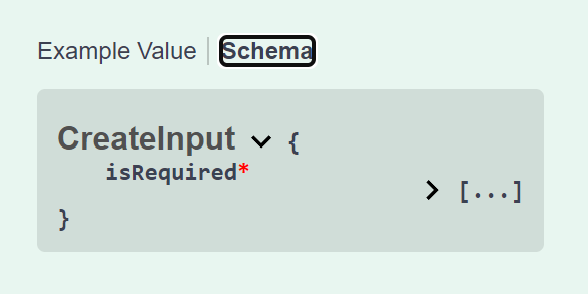
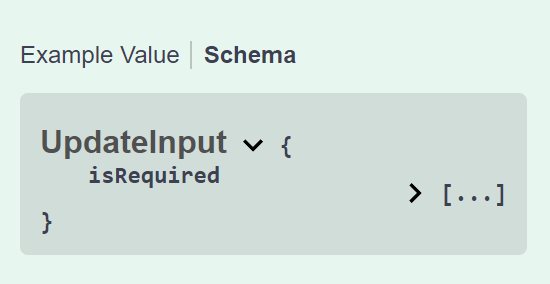
Change Log
- 2024-04-13 Initial version created.